Authoring Room Cards (Admin Guide)
Every room in the House, Annex, Garden, and Family Office Oversight has a Room Card. Most of its content is authored on the room edit form; a few parts come from other surfaces (seats, keys, Trust Indicators) or are computed by the system (the Care Protocol and Trust Pulse pills). This guide is what you author, where, and
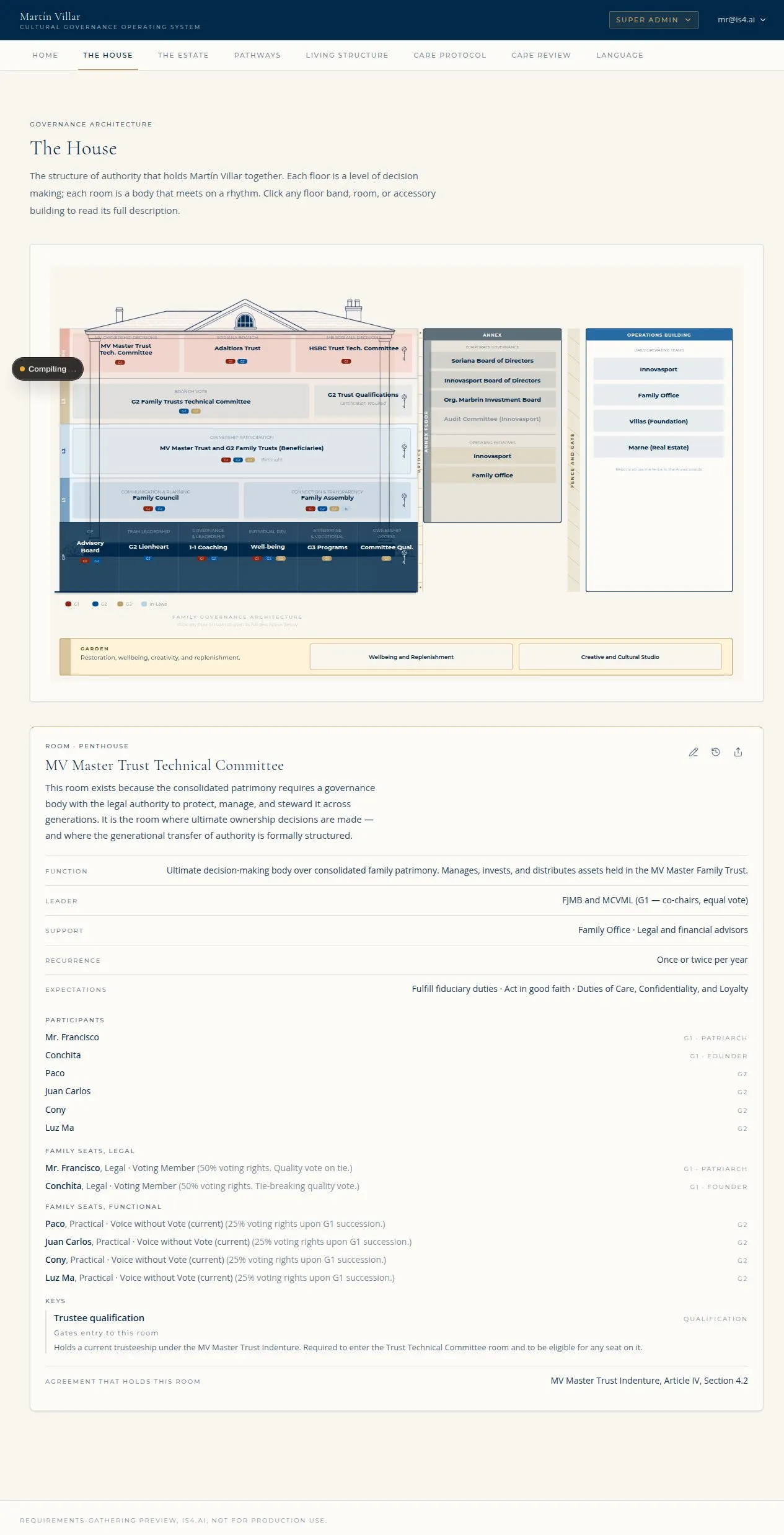
A Room Card (Room Page) with the body fields, seats, pills, and Trust Indicators (Illustrative, from the IS4 preview environment.)
how it renders.
Who can do this: room content is edited by Perpetum admins per the permissions matrix (L1 / L2 / L3, depending on the field). Building / floor / room structure (create, delete, reorder) is L3.
1. Open the room editor
- Open House Build (
/admin/house) as a Perpetum admin. - Find the room and open its edit form (the pencil control on the room).
- Author the fields below and Save changes.
2. What you author on the room form (and where it shows on the card)
| Field on the form | What it means | Where it renders |
|---|---|---|
| Name | The room's name | All card variants (header) |
| Description | What the room is; carries its meaning | Public card, Room Page |
| Function | What the room does in the system | Public card, Room Page |
| Agreement that holds this room | The named governing document (links into the Archive when set) | Public card, Room Page |
| Authority | The upstream accountability line (who holds this room accountable) | Public card, Room Page |
| Decision and Tiebreaker | How the room decides; any tiebreaker | Public card (with Authority) |
| Support | Bodies that support without holding authority | Public card, Room Page |
| Room Leader + Backup Leader | Who holds the room in practice (and backup) | Public card, Room Page |
| Authority map | The room's authority mapping | Room Page |
| Annual Commitments, What is missing, What is fragile, What needs to be built | The four room-context fields | Room Page (section 6), not the public card |
| Generation access (LG / RG / NG / IL checkboxes) | Which generations may see the room (overrides the seat-derived default) | Controls visibility / generation pills |
Rhythm, Status, Kind, and Color are also room-level fields (rhythm shows on the card; status drives the room status pill; color feeds the calendar). Set them where the room form exposes them.
3. Parts of the card authored elsewhere
The Room Card pulls several blocks from other surfaces, not the room form:
- Seats (Legal / Functional / Member): authored on the per-room seat surface.
See the Seats guide (
/admin/rooms/<roomId>/seats). - Key / Access Requirements: authored in Admin > Keys. See the Room keys guide.
- Trust Indicators: the indicator rows come from the Trust Indicators system, not the room form.
4. Parts of the card the system computes (do not author)
- System Care Protocol pill (room capacity: Paused / Reduced / Active) comes from the Care Protocol system.
- Trust Pulse pill (room reading: Healthy / Needs Attention / Needs Intervention / Paused) comes from the Trust system.
These two pill scales are never collapsed: Care Protocol reads capacity, Trust Pulse reads coherence. You do not type them on the room form.
5. How the four card variants render
The same room data renders differently by surface. Know which fields appear where:
| Variant | Where | Pills shown | Trust Indicators | Dates / Enter |
|---|---|---|---|---|
| Public Room Card | House / Living Structure | System Care Protocol only | Indicator names only | No dates, no Enter |
| Room Page (full) | Inside a room you can enter | Both (Care Protocol + Trust Pulse) | Each indicator with both pills | Dates / Zoom / Enter |
| Individual Dashboard mini-card | A person's Dashboard, per seat | Individual Care + Trust Pulse | Indicator + individual pills | Next Meeting (from room calendar) |
| Stripped | Family Office Oversight | Reduced set | Reduced | Limited |
Important (issue #26): the public card shows the System Care Protocol pill only, not a Trust Pulse pill, and indicator rows show names only. The Trust Pulse pill and per-indicator pulses appear on the Room Page, not the public card. (An older Drive field spec, v5, shows pulses on the public card; that is superseded.)
Next Generation and In-Laws see room mini-cards without any pills.
6. Quick troubleshooting
| Symptom | Likely cause | Fix |
|---|---|---|
| Edited a field but it does not show on the public card | The field is Room-Page-only (e.g., the four context fields, authority map) | Check the variant table in section 5; it likely shows on the Room Page |
| No Trust Pulse pill on the public card | By design (issue #26) | The Trust Pulse pill is on the Room Page, not the public card |
| Seats or keys missing from the card | Authored elsewhere | Add seats on the seat surface; add keys in Admin > Keys |
| Care Protocol / Trust Pulse pill looks wrong | These are computed, not authored | They come from the Care Protocol / Trust systems, not the room form |
| A generation cannot see the room | Generation access unset or excludes them | Set the LG/RG/NG/IL access checkboxes on the room form |
| Cannot edit a room's content | Insufficient role for that field | Room content edit is per the permissions matrix (L1/L2/L3); structure is L3 |